
Prompting from Zero: Get Better Answers

About This Lesson
An AI assistant can only work from what you give it. Ask in a hurry and you get an answer written for nobody; ask well and the same assistant gives you something you can use at once. This lesson teaches prompt engineering from zero: writing a request on purpose, testing it, and repairing it when the answer goes wrong, the skill a Vertex Pharmaceuticals job ad asks for by name.
It starts with one question asked twice. Adding a single phrase, "I'm a nurse thinking about a career change", turns a correct answer written for nobody into one written for the person asking. Then the prompt card: five slots, task, context, role, format and examples, built up one slot at a time on four skills from a real job posting, with zero-shot, one-shot and few-shot prompts and two invented words that show how much one example can carry.
A second practical part fixes prompts that fail: answers that are too vague, made up, off target or too big, positive instructions, long material first and the instruction last, and when "show your steps" still helps with today's reasoning models. The mini project, My Prompt Card, has you write a card, test it on three lab notes, fix one weakness and save it.
What You'll Learn
- What a prompt is, and why one phrase changes the answer
- The five slots of a prompt card
- Zero-shot, one-shot and few-shot examples
- Four prompt problems and their fixes
- When "think step by step" helps
- How to answer an interview question on inconsistent answers
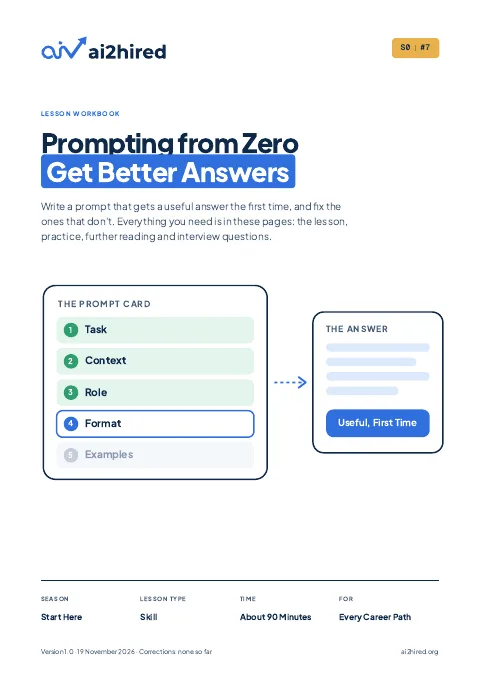
Practise This Lesson on Paper
- The whole lesson, step by step
- Exercises and homework, with answers
- Interview questions, with model answers
- A reading list to go deeper
PDF, 29 pages, Version 1.0
Sources and References
Everything this lesson states was checked against these sources before it was published.
1 Job Posting5 Documents and Papers3 Books2 Further Reading
Job Postings in the Lesson
Familiarity with Gen AI tools and prompt engineering
Principal Analyst, G&A Technology, Vertex Pharmaceuticals, Boston, MA. Indeed, posted 31 July 2026; live repost read 19 November 2026 (Built In Boston), 2026.
Official Documents and Papers
- Prompting Science Report 2: The Decreasing Value of Chain of Thought in Prompting
Wharton Generative AI Labs (arXiv:2506.07142), 2025. June 2025: asking for step-by-step reasoning helps models that do not reason by themselves, and adds little for reasoning models.
- Prompting Science Report 4: Playing Pretend: Expert Personas Don't Improve Factual Accuracy
Wharton Generative AI Labs (arXiv:2512.05858), 2025. December 2025: telling a model it is an expert did not make its answers to hard questions more accurate.
- Reasoning best practices
OpenAI developer documentation, 2026. How to prompt reasoning models, which work through a problem before answering.
- Lost in the Middle: How Language Models Use Long Contexts
Liu and colleagues, Transactions of the Association for Computational Linguistics (arXiv:2307.03172), 2024. Information in the middle of a long prompt gets less attention than at its start and end.
- Prompting best practices
Anthropic documentation, 2026. The maker of Claude on clear instructions, examples, and putting long documents before the question.
The Books Behind This Lesson
This lesson was researched from these books. Read them to go deeper:
 Prompt Engineering for LLMs
John Berryman and Albert Ziegler, O'Reilly, 2025
 Hands-On Large Language Models
Jay Alammar and Maarten Grootendorst, O'Reilly, 2024
 Introduction to Generative AI
Numa Dhamani and Maggie Engler, 2nd edition, Manning, 2026


Further Reading
 Prompt Engineering
Lee Boonstra, Google, 2024
 AI Engineering
Chip Huyen, O'Reilly, 2025


Corrections
None so far. If you spot an error, tell us in the comments under the video or through the contact form.
Job postings belong to their companies; ai2hired is not affiliated with them. How sources are chosen and checked.
Transcript
Read the Full Transcript
The Job Line: Prompt Engineering
You'll find this line in job descriptions for several roles, on LinkedIn and on job boards. Familiarity with Gen AI tools and prompt engineering. By the end of this video, you'll write prompts that get a useful answer the first time, and you'll know how to fix the ones that don't.
Prompting From Zero: Get Better Answers
This is prompting from zero, and how to get better answers. Let's get into it.
The Big Picture
Remember the car from our lesson on AI assistants, where a chat was simply a driver talking to an engine? Here it is again, and this time we look at what travels between those two. You know the whole car by now, with its dashboard, its fuel and its brakes, and the road that keeps it running. When you ask an assistant for something, the engine can't see your face or guess what you already have in mind. All it gets is the context, the words and facts handed to it along with your request.
In a chat assistant, the part of that context you write yourself is the prompt, and it's the part that matters most. Today, we'll build a prompt card you can reuse, so the engine gets exactly what it needs from you, every single time.
A Vague Question
Let's start with a question you might really type into an assistant on a normal day. I'll ask ChatGPT to explain in two sentences what an AI engineer does, and I won't tell it anything about myself. The answer is correct, and it could have been written for anyone on Earth, because nothing in my question said who was asking.
What a Prompt Is
What I typed is called a prompt, and a prompt is everything you give the model to work from, your question, your instructions and any text you paste in. The exact words matter because the model doesn't know what you meant, and it only continues from the words you actually gave it. Writing those words on purpose is called prompting, and it's a skill you can practise like any other. Prompt engineering is the skill of testing and improving a prompt until it gives you what you need, time after time.
Same Question, One Extra Phrase
Now watch what one extra phrase does to that same question. I ask again in a new chat, and this time I add that I'm a nurse thinking about a career change. The second answer still defines the job, and then half of it speaks straight to a nurse, about what she could bring to AI in healthcare. Nothing about the assistant changed between those two answers, and the only thing that changed was what I told it.
Briefing a New Colleague
Think of it as briefing a capable new colleague on their very first day. They're fast and they know a great deal, but they know nothing about your project, your reader, or what a good result looks like to you. So you wouldn't just say write the report, because you'd say who it's for, what it's about and how long it should be. The picture has one limit, because a real colleague asks questions back when your brief is unclear, while an assistant usually just answers.
The Prompt Card
A good brief answers five questions, and we'll keep them on one card for the rest of this lesson. The task says what to do and with what material, and the context says who is asking and why. The role says who the assistant should answer as, the format sets the shape, the length and the reader, and the examples show what a good answer looks like. So the rule for this lesson, and for every prompt you'll ever write, is to say exactly what you want.
In a chat, the prompt is the part of the context you control, so this one card covers everything in your hands. In real applications, engineers manage everything the model sees on purpose, a practice called context engineering, which we'll open up in Season eight. For now, let's fill the card one slot at a time, inside a real assistant.
Hands-On: Slot 1, the Task
We'll work in the same two free accounts as before, ChatGPT and Claude. If you don't have them yet, the written steps are linked in the description, and creating each account takes about five minutes. Slot one is the task, and a task needs two things, a clear verb and the material to work on. Our material is real, because it comes straight from the job posting that opened this video. So the prompt says to explain each skill, and then it gives the four skills, word for word.
Each explanation is accurate, and the answer runs for screen after screen, as if I were already preparing an interview for that job.
Slot 2: The Context
Slot two is the context, which is who you are and why you're asking. I add one sentence saying that I'm a lab technician with no IT background, and that I want to know how far I am from a job like this. Now the same four skills come back in plain words, with examples set in a laboratory, and the answer opens by saying I may be closer than I think.
Slot 3: The Role
Slot three is the role, where you tell the assistant who it should answer as. Here I ask it to answer as a career coach who helps people move into AI jobs. A role like this is also called a persona, the character you ask the model to play, and it changes the voice and the level of the answer. The assistant now says it will answer as a coach, and it closes with personal advice, telling me not to underestimate my laboratory experience.
Slot 4: The Format
Slot four is the format, which covers the shape of the answer, its length and its reader. Without it the assistant picks a shape for you, so I ask for a table with three columns, written for a beginner, in under a hundred words. The same content now fits on one screen, in the three columns I asked for. The length is another story, because this answer runs to more than a hundred and fifty words, far over the hundred I allowed it.
An assistant doesn't count words the way you do, so a length you ask for is a target, and you check it when the number matters. There's also a hard limit on how much an assistant can write in a single answer. When a long answer hits that limit it simply stops, sometimes in the middle of a sentence, so that limit is a stop and never a style.
Slot 5: The Examples
Slot five is examples, and it comes with three names you'll hear in interviews and at work. A prompt with no example at all is called zero-shot, which is how every prompt so far in this lesson was written. Give it one example of the answer you want and it becomes one-shot, and with two or more examples it's called few-shot prompting. Here's how much a single example can carry, with two words I invented for this lesson.
I tell Claude that a tavlin is a small glass spoon for the lab, and I give it one example sentence. Then I define a second invented word, bimple, and I ask for a sentence that uses it. Can it correctly use a word that didn't exist five minutes ago? It can, and its sentence even gives a reason for labelling a tube upside down, all from one definition and one example sentence. Back on our card, I add one example row to show the style I want in the table.
The first row of the answer comes back almost word for word as my example, which is exactly why examples need a little care. The model follows your examples very closely, so when you give several you vary them, or it will copy a pattern you never meant.
The Full Card, Run in Claude
The card is full, so let's run the whole prompt in our second assistant and see how well it travels. Claude returns the same kind of table in its own words, which tells us the prompt works beyond one assistant. From here you improve it the way engineers do, by changing one thing at a time and comparing the two answers. Change two things at once and you'll never know which one made the difference.
Four Problems, Four Fixes
Even a good card will sometimes give you a bad answer, and almost every bad answer is one of four kinds. When the answer is too vague, the prompt was usually vague as well, so you add context and a format. When it's made up, you paste in the text it should work from, and you still verify before you trust. Asking the assistant whether it's sure isn't a check, because it can defend a wrong answer or abandon a right one.
When the answer is off target, you say who it's for and what you want, in plain words. And when the job is simply too big, you split it into steps and ask for one step at a time.
Say What to Do
One habit fixes many off-target answers, and it's to say what to do instead of listing what to avoid. Telling it not to use jargon leaves the assistant guessing what you do want, while asking for plain words a beginner knows gives it something to aim for. The same goes for length, because asking it not to make the answer too long says very little, while asking for under a hundred words gives it a clear target.
Long Prompts
A second habit matters when you paste in something long, like a whole report or a long email thread. Researchers call this the lost in the middle effect, because the middle of a very long prompt can get less attention than its start and its end. So you put the long material first and your instruction last, where it's hardest to miss.
Show Your Steps
The last tool is for tasks with several steps, like a calculation or a plan with stages. You ask the assistant to show its steps, one per line, before it gives the final answer. This technique is called chain of thought, and the well-known advice to tell a model to think step by step is its shortest form. Here each line can be checked on its own, and the final answer of twenty-eight vials is right. But line two calls fifty-six the vials used on Monday, when it's really the number that was still in the boxes that evening.
You can only catch a slip like that because the work is on the screen. Many of today's assistants can use reasoning models, newer models that work through a problem on their own before they answer. With those the phrase adds little, and the real benefit is that you can see the work and check it.
Common Mistakes
Three mistakes show up again and again, and the first is believing that a longer prompt is always a better one. Extra text that doesn't serve the task only gives the assistant more to be distracted by, so you add what the task needs and you cut the rest. The second mistake is thinking that a role turns the model into a real expert. In twenty twenty-five, researchers at Wharton tested expert roles on hard exam questions across six models, and the roles brought no reliable gain in accuracy.
A role sets the voice, and the facts still need your check. The third mistake is trusting a prompt because it worked once. One good answer can be luck, since the same prompt can bring back different answers, and assistants are updated all the time. So you test it on three different inputs before you rely on it, and you test it again when the assistant changes.
Mini Project: My Prompt Card
Now it's your turn to build a card of your own, in a mini project called My Prompt Card. The job comes straight from a pharma lab, where a scientist's note has to become a short summary that a manager can read in seconds. Many of our examples come from pharma, the course director's field. The skill works the same in any industry. It takes about thirty minutes, and you'll follow the four steps on the screen. Step one is to write the card, and you already know its five slots.
The task is to summarize the note for a manager, and the context says she decides whether a batch moves on and has no lab training. The role is a quality lead writing a short update, and the format is three lines that give the test, the result and the next step. For the last slot we give two examples, each one a short lab note with the summary we'd want for it. Step two is to test it, because one good answer proves very little, as you saw a minute ago.
I paste the card with a first note about a routine tablet test, and the summary comes back in three clean lines. Then I run the same card on two more notes, and I check each summary against its note, line by line. Only the third summary is right, because the first two end by saying the batch can move on, which neither note ever says. That decision belongs to the manager, and my own first example makes exactly the same move.
Step three is to fix one weakness, and only one, so that we know what the change really did. I change the last line of my first example, so that it reports no next step when the note gives none. Then I run the first note again, and this time the last line simply reports that no further action is stated, without any decision about the batch. The second note gives the same result, so the model had copied my example, and its flaw came along with it.
Step four is to save the card somewhere you'll find it again, with one line on what you changed and why. You've just built a reusable prompt, tested it on three inputs and fixed it, which is prompt engineering in its simplest honest form. For your turn, write a card for a task from your own week, and test it on three real examples.
Interview Angle
In interviews for roles that work with AI assistants, you can expect a question like this one. How would you improve a prompt that gives inconsistent answers? A strong answer has three parts, and you practised every one of them in this lesson. First you make it specific, with a clear task, the context and an exact format, so that less is left to chance. Then you add examples, two or three varied ones, which is called few-shot prompting, because examples often show a style better than rules can describe it.
And you finish with how you'd test it, on several inputs, changing one thing at a time and comparing the results.
Recap
Here's the short version of everything we built in this lesson. A prompt is everything you give the model, and a good one fills all five slots of the card, from the task to the examples. When an answer goes wrong, you name the problem, change one thing and test again, and you ask for the steps when a task has several. Above all, you say exactly what you want, because the model only has your words. The exercises, further reading and interview questions for this lesson are in the free workbook on ai2hired.
org, linked in the description. So the next time an answer disappoints you, you'll know which slot of the card was left empty.
Your New CV Line
Here's your new CV line. Write and test structured prompts, with clear context, an output format and few-shot examples. It's yours to add, starting today.